 LinkTapes.com
Tape idea · Collaborative playlist
A collaborative playlist for friends who don't share one app
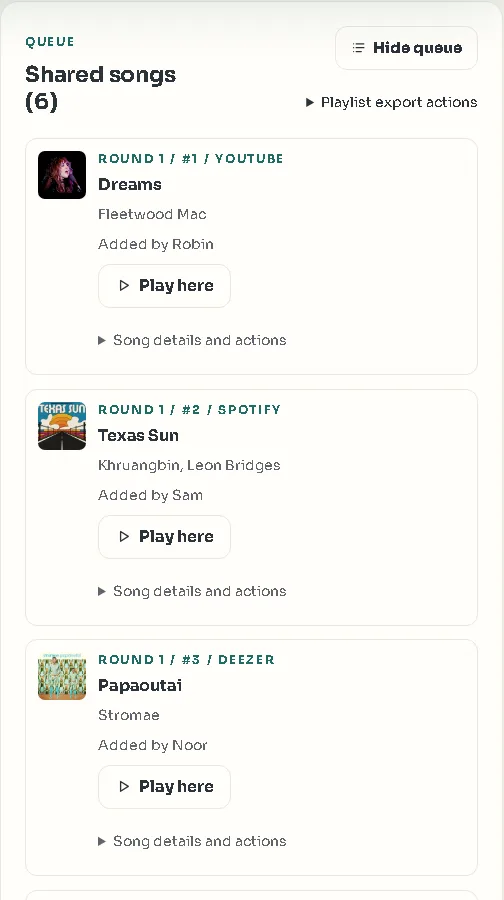
Collaborative playlists sound simple until you try one with a real group of friends: half of them use a different app, and one person adds forty songs on the first night. A Link Tapes tape fixes both. Everyone joins from one link, adds songs from YouTube, Spotify or Deezer, and takes turns, one song each per round.
Start a tapeWhy collaborative playlists fall apart
The collaborative playlists built into streaming apps work well inside one service. A Spotify collaborative playlist lets friends add, remove and reorder songs, but everyone who adds songs has to be on Spotify. The friend who lives on YouTube, or the one who pays for Deezer, is left out.
The second problem is fairness. In a shared playlist, whoever is keenest wins. The first person to open it adds twenty songs, the quiet friend adds one, and a week later the playlist sounds like one person's taste.
And a playlist is silent. You see a new song appear, but not why someone picked it, and there's nowhere to react.
How a Link Tapes tape works
A tape is a shared playlist with a few rules that keep a group happy:
- One link for everyone. Friends open it, type a name and they're in. No account, no app to install.
- Mix your services. Songs from YouTube, Spotify and Deezer sit in the same queue and play back to back.
- Take turns. Each person adds one song per round, in turn order, so every voice gets the same space.
- Say why. Every pick can carry a short note, and there's a chat beside the tape for the reactions.
- Keep it moving. The host sets how long a turn can wait before it can be skipped, from one minute to four weeks.
Link Tapes or a Spotify collaborative playlist?
They solve different problems, and in some cases Spotify's own collaborative playlist is the better choice.
| Link Tapes tape | Spotify collaborative playlist | |
|---|---|---|
| Music services | YouTube, Spotify and Deezer in one queue | Spotify only |
| Joining | Open the link and type a name | A Spotify account; the invite link lasts 7 days |
| Who adds what | One song per person per round | Anyone adds, removes or reorders at any time |
| Talking about the songs | A note on each pick, plus a chat | Not part of the playlist |
| Full-length playback | YouTube for everyone; Spotify and Deezer with a Premium account signed in | Full songs in the Spotify app |
| Offline listening | No | With Spotify Premium |
If your whole group already uses Spotify and just wants one big shared list, use Spotify's. If your friends are spread over different apps, or you want everyone to get a turn, use a tape.
Good ways to use a collaborative tape
Anywhere a group shares the music, turns make it fairer. Some favorites:
- A road trip. Everyone adds a song or two before you leave, and the tape plays in the car.
- An old group chat. Call a theme each week (“a song from 2012”, “a cover better than the original”) and take turns.
- Friday at work. One song each for the last hour of the week.
- A club or a class. The turn order gives the quiet members the same say as the loud ones.
How to set one up
- Create a tapeStart one from the Link Tapes homepage. No account needed.
- Choose the rulesSet the skip timer. If you want it private, make it a Backstage tape with an access code and a seat limit.
- Share the linkDrop it in the group chat. Friends join with just a name.
- Take turnsAdd a song when it's your turn. The tape shows whose turn it is.
- Keep the listWhen the tape is done, export the track list.
Questions people ask
Can friends on different streaming services add to the same playlist?
Yes. A tape holds songs from YouTube, Spotify and Deezer at the same time, so each friend adds from the service they use.
Do my friends need an account?
No. They join a tape from its link with just a display name. Accounts are optional.
How do the turns work?
Everyone adds one song per round, in turn order, and then the next round starts. The host decides how long a turn can wait before it can be skipped.
Can I limit who joins?
Yes. The host can set a seat limit, and a Backstage tape also needs an access code to join.
Does it work with Apple Music?
No. Link Tapes works with YouTube, Spotify and Deezer, and with SoundCloud on tapes where the host allows it.
Is it free?
Yes. Creating a tape, joining it and listening are free.
Start your group's tape
Create it now, drop the link in the group chat, and see who adds the first song.