 LinkTapes.com
Birthdays, weddings & events
Collect songs for your celebration
Collect everyone’s song ideas before the celebration. No turns. Add one track or a whole batch.
Start a request tapeA request list you choose from
Before the birthday, wedding or reunion, ask everyone what they would love to hear. A Link Tapes tape keeps their suggestions together, with the person who added each song and an optional note explaining the choice. Friends join through a link with just a name; they do not need an account or an app.
Use it as a music shortlist for the organizer or DJ. A request is a suggestion, not a promise that the song will be played. Collect first, then decide what fits the guests, the moment and the event. You can leave the tape open for days or weeks while people add ideas whenever they have time.
- InviteOne tape link for your guests.
- CollectEveryone adds, whenever they like.
- ChooseYou or your DJ make the final selection.
Set up a tape without turns
Create a tape on the homepage and open Extra settings before creating it. On an existing tape, join as its curator and open Tape settings. Use these choices:
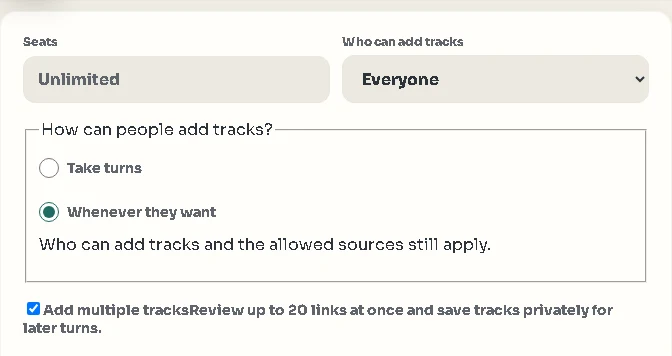
- Who can add tracks → EveryoneLet every participant contribute. Leave Seats blank for unlimited seats if you do not want a fixed guest limit.
- How can people add tracks? → Whenever they wantThis removes turns and waiting. There is no per-turn track limit in this mode, so a guest can come back and keep adding suggestions.
- Add multiple tracks → OnEnable the Multiple links button so guests can review up to 20 individual track links at once. They can add another batch afterwards.
- Choose sources and saveKeep the music sources your group needs enabled, then select Save tape settings. For a surprise or an invitation-only event, create a Backstage tape and share its access code with the invited guests.
Guests can add a batch at a time
- Open the invitationOpen the tape link, join with a display name and select Multiple links. A single song link still works through the usual input.
- Paste, check and arrangePaste up to 20 track links, one per line. Use individual song links from the allowed sources, rather than an album or playlist URL. Review the results, deselect unwanted songs, change their order and add a note where it helps.
- Add the selection to the tapeConfirm the selected songs. Fix any invalid or unavailable links and review duplicate warnings before including a repeated song. There is no need to wait for another guest: add more tracks or another batch whenever you want.
A whole batch can arrive together. The list records contributions as they are accepted; it does not automatically rank the songs or turn them into a running order for the event.
Give guests a useful starting point
Planning a spooky celebration? Start with the 24-song Halloween playlist, then invite guests to suggest their own picks.
Share a short brief with the invitation. Tell people what the music is for and when you would like their suggestions. Specific prompts make choosing easier:
- Birthday: “Add the songs that remind you of us: a road trip, a first concert, or the year we met. Tell us why.”
- Wedding: “What gets you onto the dance floor? Add your favorites and note whether they fit dinner or dancing.”
- Reunion or work event: “Bring your team’s favorites, forgotten classics and one unexpected pick. Add a note about the mood.”
Set a social guideline if it helps, such as a handful of favorites each. The anytime setting lets people contribute freely; your invitation explains how broad or focused you want the collection to be.
Turn suggestions into your own selection
Before the event, review the tape’s track list with your co-organizer or DJ. Read the notes, look for repeated favorites and decide which songs suit each part of the day. Prepare the final selection in the music setup you plan to use.
The shared tape is your source of ideas. It does not automatically build a playlist in another service, schedule wedding moments or guarantee that every request is suitable. You keep the final say.
Check playback before the day
You can open songs while reviewing suggestions. YouTube can play full tracks when embedding is allowed. Spotify and Deezer may play previews unless the listening browser is signed in to Premium for that service. Adding a link does not guarantee full playback at your venue.
If you want to play directly from the tape, test the actual speaker device and the songs beforehand. For a wedding or a larger event, agree on the final music and playback setup with whoever is responsible for the sound.
Questions people ask
Can guests add songs without taking turns?
Yes. Set Who can add tracks to Everyone and How can people add tracks? to Whenever they want. Guests can add independently, without a turn or a per-turn track limit.
How many songs can someone add at once?
With Add multiple tracks enabled, each paste accepts up to 20 individual track links. Guests review and confirm their selection, then can add more batches. There is no per-turn limit in anytime mode.
Is this a ready-made birthday or wedding playlist?
It is a shared list of suggestions from your guests. You or your DJ choose which songs to play and prepare the final running order in your event’s music setup.
Do guests need an account or the same music app?
No Link Tapes account is needed to join a public tape. Guests enter a name and add individual links from the sources the curator allows. For a Backstage tape, they also need its access code.
Can I paste a whole playlist link?
The Multiple links flow reviews individual track links, one per line. It does not unpack an album or playlist URL. Copy the individual song links you want to suggest.
Let everyone bring their song ideas
Start a tape, use the collection settings, and send one link to your guests.