 LinkTapes.com
Tape idea · Mixtape
Make a mixtape online
A playlist link says “here are some songs”. A mixtape says “I picked these for you, in this order, for a reason”. Link Tapes lets you make the second kind in your browser: add songs from YouTube, Spotify or Deezer, write a note on each one, and send a single link. The person you send it to presses play. No account, no app.
Start a tapeWhy a mixtape still beats a playlist link
Streaming made songs easy to share, and a little easy to ignore. A link lands in a chat between memes and screenshots, and nobody knows why you sent it.
A mixtape was different because it cost you something. You chose the songs, you chose the order, and you wrote the track list by hand. Whoever held it knew you'd spent an evening thinking about them. That's the part worth keeping.
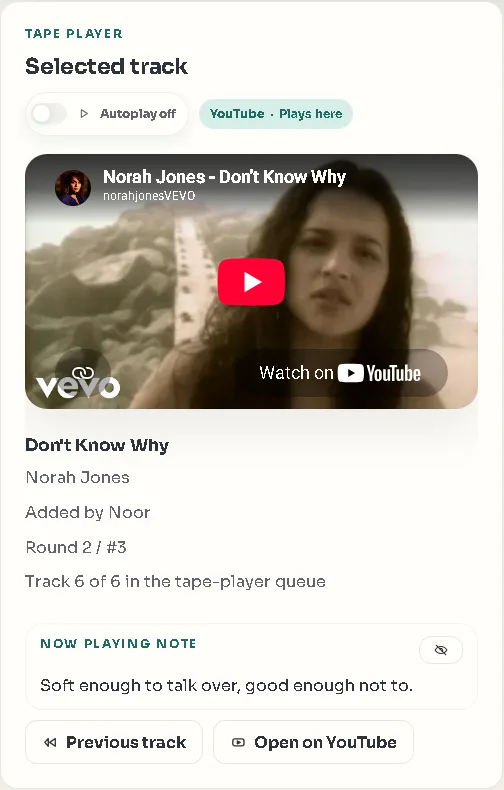
On Link Tapes, a tape keeps that shape. Songs play in the order you added them, back to back, and every song can carry a short note: why this one, where you first heard it, which line to listen for.
How to make a mixtape with Link Tapes
It takes about as long as choosing the songs, and you don't need an account to start.
- Start a tapeOn the Link Tapes homepage, give your tape a name, like “For Sam” or “Songs for the drive home”, and create it. You're its first member, so every turn is yours.
- Add the first songPaste a link to a song on YouTube, Spotify or Deezer. It goes straight into the tape.
- Write the noteAdd a line to the song: a memory, a mood, a lyric to listen for. This is what turns a list into a mixtape.
- Keep goingAdd the rest one by one, in the order you want them heard. Ten to fifteen songs is a good length: long enough for a mood, short enough to finish.
- Send the linkShare the tape's link in a message. That's the whole gift.
Or make one together
A tape doesn't have to come from one person. Invite friends and everyone takes turns: each person adds one song per round, and the tape plays them back to back. Nobody can bury the rest under their own favorites, and you hear what everyone picked, with their note attached.
It works well for a gift from a whole group: a birthday tape where every friend adds the song that reminds them of the birthday person, or a farewell tape for someone who's moving away. There's a chat beside the tape, so the reactions stay with the songs.
If friends are slow to add their song, the host decides how long a turn can wait before it can be skipped, from one minute to four weeks. A tape can come together in one evening, or grow over a month.
Tips for a mixtape people actually play
There are no rules, but a few habits make the difference between a tape someone plays once and one they come back to.
- Open with the song you're surest about. The first track decides whether they keep listening.
- Mind the order. A quiet song after a loud one sounds deliberate; two slow ones in a row make the tape sag.
- Keep the notes short. One honest line beats a paragraph.
- Pick a theme if you're stuck: one season, one year, one trip, one inside joke.
- End on purpose. The last song is the one they'll remember.
- For a gift, choose YouTube versions where you can. YouTube plays full songs for everyone, while Spotify and Deezer play a short preview unless the listener is signed in with a Premium account for that service in their browser.
What the person you send it to sees
They open the link and see the tape: its name, the songs in order, who added each one, and your notes. They can press play right away, without signing up or installing anything, and the songs play one after another.
If they want to answer, they type a name, join, and add a song back. A mixtape that talks back is the best kind.
Want it to stay between the two of you? Make it a Backstage tape: it needs an access code to get in, and you can limit how many people can join. And if they want to keep the songs, the track list can be exported.
Questions people ask
Is Link Tapes free?
Yes. Making a tape, sharing it and listening to it is free.
Does the person I send it to need an account?
No. They open the link and press play. If they want to add a song back, they only need to type a name.
Which music services can I use?
YouTube, Spotify and Deezer, mixed in the same tape. YouTube plays full songs for everyone; Spotify and Deezer play a preview unless the listener is signed in with a Premium account for that service in their browser.
Can I make a mixtape together with friends?
Yes. Share the tape's link and everyone takes turns, adding one song per round.
Can I keep a mixtape private?
Yes. A Backstage tape needs an access code to join, and you can limit how many people can join it.
Make your first mixtape
Pick the first song now and the rest will follow. It's free, and the person you send it to doesn't need an account.