 LinkTapes.com
Tape idea · Party
Pass the aux, without passing your phone
Whoever holds the aux holds the party. Hand your phone around and it comes back with a cracked screen and three songs by the same band. With Link Tapes, the phone stays by the speaker and the aux goes around the room instead: everyone adds a song from their own phone when it's their turn, and the tape plays them in order.
Start a tapeThe trouble with the aux
At a small party, the music usually gets decided in one of two ways. One person plays their playlist all night, or a phone gets passed around and every song is a negotiation. Neither is much fun for the friend who only wanted to play one song.
Passing the aux works because everyone gets a moment. It goes wrong when one phone has to travel. A shared tape keeps the moment and drops the traveling.
How it works at a party
- Set up the speakerOn the phone or laptop connected to the speaker, create a tape on the Link Tapes homepage and leave it open.
- Keep turns shortSet the skip timer to a minute or two, so nobody holds up the music while they scroll.
- Share the linkPost it in the group chat. Guests open it on their own phones, type a name and join. There is no app to install.
- Pass the auxEach guest adds a song when it's their turn, and the speaker plays the songs back to back.
- Keep the room movingA turn that runs out of time can be skipped, so one slow guest never stops the music.
Just friends and family: make it Backstage
For a birthday at home or a family dinner, you don't want strangers wandering in. A Backstage tape needs an access code to join, and you can set a seat limit so the tape holds exactly the people in the room.
Say the code out loud or write it on the fridge. Everyone who knows it is in, and the tape stays private after the party.
Make it a game
Link Tapes doesn't keep score, so the room does. Call a theme for each round and let everyone answer with a song:
- The song from your first concert.
- A guilty pleasure you'll defend to the end.
- A song your parents played in the car.
- The best cover of all time.
- A song for the person on your left.
Judge each pick in the chat, or by who sings along. Kids and grandparents can play too: all they need is a name.
Go wild in the chat
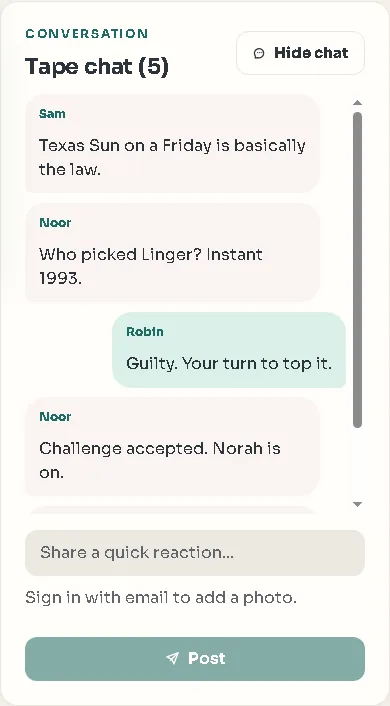
Every tape has a chat beside the music, and every pick can carry a note. That is where the party talks back: the groan at a terrible pick, the story behind a good one, the argument about which version is the real one.
Guests who sign in can share photos in the chat too, so the tape ends up holding the songs and the pictures from the night. Signing in is optional; everyone else joins with just a name.
Tips for the speaker device
A few things make the night run smoothly:
- Play the tape on one device only, the one connected to the speaker. Guests only need their phones to add songs and chat.
- YouTube songs play in full everywhere. For full Spotify or Deezer songs, sign in with a Premium account for that service in the speaker device's browser; otherwise they play as a preview.
- Browsers want one tap before they play sound, so press play once when the party starts.
- Keep the tape open on the speaker device, so each next song starts by itself.
Questions people ask
Do guests need to download an app?
No. Link Tapes runs in the browser. Guests open the link, type a name and join.
Does everyone's phone play the music?
It doesn't need to. Play the tape on the device connected to the speaker; guests use their phones to add songs and chat.
Can I keep strangers out?
Yes. A Backstage tape needs an access code to join, and you can limit the number of seats.
Is there voting or scoring?
Not built in. Most groups judge each pick in the chat, and that's half the fun.
Is it free?
Yes. Creating a tape, joining it and listening are free.
Start the party tape
Open a tape on the speaker device, share the link, and let the room decide.