 LinkTapes.com
Tape idea · Spotify Jam alternative
A Spotify Jam alternative for everyone in the room
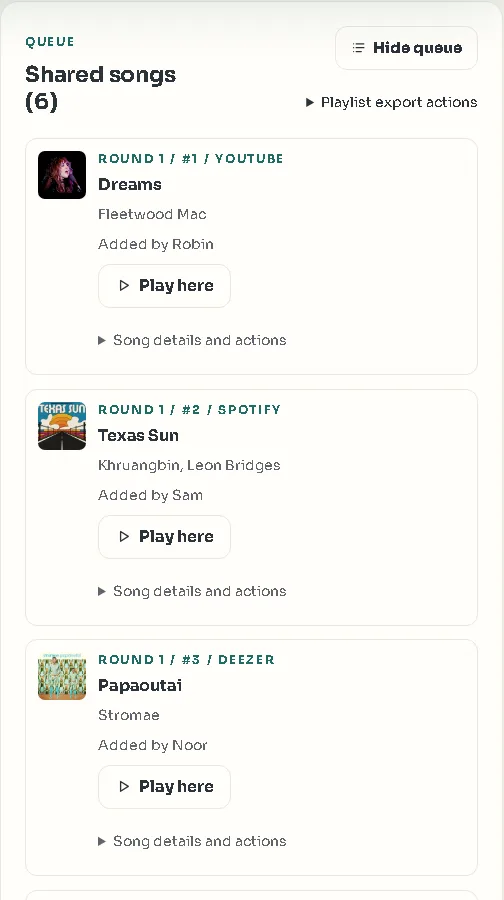
A Spotify Jam works well at a party when someone has Premium and everyone uses Spotify. When that isn't your group, try a tape. One phone or laptop plays through the speaker. Friends open the link on their own phones and add songs from YouTube, Spotify or Deezer, one turn each. Nobody needs Premium or an account to join.
Start a party tapeWhat a Spotify Jam needs
Spotify's help page currently says that Premium is needed to start and host a Jam. Free users can join a Jam hosted by a Premium user and add songs, as long as they are in the same room. Joining from somewhere else needs Premium too. Everyone joins through the Spotify app, so everyone needs a Spotify account.
That leaves two common party problems. Nobody in the room has Premium. Or half the room listens on something else: the friend who lives on YouTube, the cousin who pays for Deezer. A tape is built for that room.
A tape and a Jam, side by side
Both put the guests' songs on one speaker. The Spotify column follows Spotify's help page.
| Link Tapes tape | Spotify Jam | |
|---|---|---|
| Starting one | Free, no account needed | Premium |
| Joining | Open the link in a browser and type a name | The Spotify app; free accounts in the same room, Premium from a distance |
| Where songs come from | YouTube, Spotify and Deezer in one queue | Spotify only |
| Who picks next | One song per person per round, in turn order | Anyone can add, rearrange and skip, unless the host limits guests to adding songs |
| Listening from different places | Each device plays the tape on its own; playback is not synced | Remote listening, with Premium |
| Full-length playback | YouTube songs whose owner allows embedding; Spotify and Deezer with a Premium login on the speaker device | Full songs on the host's Premium account |
| After the party | The tape, its notes and the chat stay | The Jam ends when the host leaves |
A tape asks less of your guests: no Premium, no Spotify account and no app. In return, songs from Spotify and Deezer need a Premium login on the speaker device to play in full.
How to run a tape at a party
- Pick the speaker deviceUse the phone or laptop that is connected to the speaker. Create a tape on the Link Tapes homepage and leave it open there.
- Set a short skip timerA minute or two works at a party. When someone's turn runs out, the turn can be skipped, so nobody holds up the queue.
- Share the linkPost it in the group chat. Guests open it, type a name and join. There is nothing to install.
- Take turnsEveryone adds one song per round, from the service they use, with a note if there's a story behind it.
- Play from the speaker deviceThe picks play on the speaker device in turn order. Guests keep their phones for choosing songs and for the chat.
When a Jam is the better choice
A tape is not a better Jam in every situation. Use Spotify's Jam when:
- Everyone already uses Spotify and the host has Premium. A Jam then needs no extra link.
- You are in different places and want to hear the same song at the same moment. Link Tapes doesn't do that: each device plays the tape on its own. Spotify says joining a Jam remotely needs Premium.
- You want the music to start from a smart speaker, a TV or a car, which Spotify supports for Jams.
A tape fits the other case: one room, a mix of music apps, nobody with Premium, and a group where everyone should get a turn.
What plays on the speaker
Try a few songs on the speaker device before your guests arrive, because playback depends on the browser and the music service:
- YouTube songs play in full when their owner allows embedding, and the tape moves on to the next YouTube song by itself.
- Spotify and Deezer songs play as previews unless the speaker device's browser is signed in to Premium for that service. You may need to start them yourself.
- Apple Music is not supported.
Keep it to the people in the room
For a birthday or a family evening, make it a Backstage tape. It needs an access code to join, and a seat limit keeps it to the people at the party. Say the code out loud and everyone who hears it is in.
Every tape has a chat beside the music, and every pick can carry a note. When the party is over, the tape stays, with every song in turn order and the stories behind them.
Questions people ask
Can you do a Spotify Jam without Premium?
Not as the host. Spotify's help page currently says Premium is needed to start and host a Jam; free users can join one in person and add songs. A Link Tapes tape doesn't need Premium to start, join or add songs.
Do my friends need Spotify to add songs?
No. Guests open the link in their browser, type a name and add songs from YouTube, Spotify or Deezer. They don't need an account or an app.
Will Spotify songs play in full?
Only on a speaker device whose browser is signed in to Spotify Premium. Otherwise Spotify songs play as previews, and Deezer songs do too without Deezer Premium. YouTube songs play in full when their owner allows embedding.
Can we listen together from different places?
Not at the same moment. Each device plays the tape on its own, and Link Tapes doesn't sync playback. For listening at the same time from different places, a Spotify Jam is the better choice; Spotify says joining one remotely needs Premium.
Does it work with Apple Music?
No. Link Tapes works with YouTube, Spotify and Deezer.
Is it free?
Yes. Creating a tape, joining it and listening are free. Full-length Spotify and Deezer songs still need a Premium login on the speaker device.
Start a tape for the party
Open it on the speaker device, drop the link in the group chat, and let everyone take a turn.